> ## Documentation Index
> Fetch the complete documentation index at: https://friendli.ai/docs/llms.txt
> Use this file to discover all available pages before exploring further.
# Serving Multi-LoRA Models
> Serve multiple LoRA-adapted LLMs simultaneously with Friendli Container without additional GPU resources. No retraining needed for task-specific models.
## Introduction
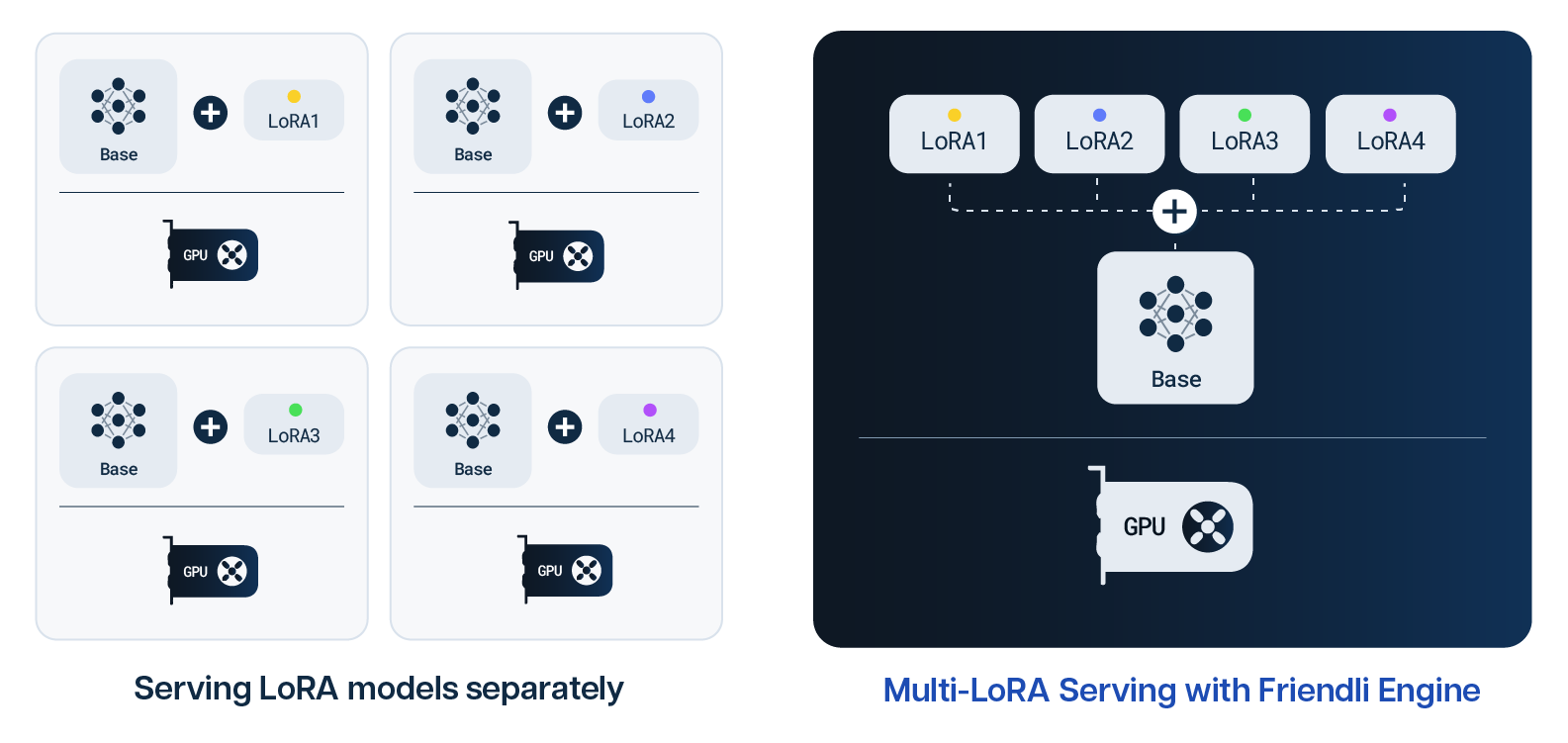
As the demand for highly specialized AI capabilities surges, deploying multiple customized large language models (LLMs) without additional GPU resources represents a significant leap forward.
The Friendli Engine addresses this challenge through Multi-LoRA (Low-Rank Adaptation) serving. This method lets you simultaneously serve multiple LLMs optimized for specific tasks, without extensive retraining.
This advancement opens new avenues for AI efficiency and adaptability, promising to revolutionize the deployment of AI solutions on constrained hardware.
This article provides an overview of efficiently serving Multi-LoRA models with the Friendli Engine.
 ## Prerequisites
Install `huggingface-cli` in your local environment.
```sh theme={null}
pip install "huggingface_hub[cli]"
```
## Downloading Adapter Checkpoints
Download each adapter model you want to serve to your local storage.
```sh theme={null}
# Hugging Face model name of the adapters
export ADAPTER_MODEL1=""
export ADAPTER_MODEL2=""
export ADAPTER_MODEL3=""
export ADAPTER_DIR=/tmp/adapter
huggingface-cli download $ADAPTER_MODEL1 \
--include "adapter_model.safetensors" "adapter_config.json" \
--local-dir $ADAPTER_DIR/model1
huggingface-cli download $ADAPTER_MODEL2 \
--include "adapter_model.safetensors" "adapter_config.json" \
--local-dir $ADAPTER_DIR/model2
huggingface-cli download $ADAPTER_MODEL3 \
--include "adapter_model.safetensors" "adapter_config.json" \
--local-dir $ADAPTER_DIR/model3
...
```
This will result in directory structure like:
```text theme={null}
/tmp/adapter/model1
- adapter_model.safetensors
- adapter_config.json
/tmp/adapter/model2
- adapter_model.safetensors
- adapter_config.json
/tmp/adapter/model3
- adapter_model.safetensors
- adapter_config.json
```
If an adapter's Hugging Face repo does not contain `adapter_model.safetensors` checkpoint file, you have to manually convert `adapter_model.bin` into `adapter_model.safetensors`.
You can use the [official app](https://huggingface.co/spaces/safetensors/convert) or the [python script](https://github.com/huggingface/safetensors/tree/main/bindings/python) for conversion.
## Launching Friendli Engine in a Container
When you have prepared adapter model checkpoints, now you can serve the Multi-LoRA model with Friendli Container.
In addition to the command for running the base model, you have to add the `--adapter-model` argument.
* `--adapter-model`: Add an adapter model with adapter name and path. The path can be a Hugging Face hub name.
```sh theme={null}
# Fill the values of following variables.
export HF_BASE_MODEL_NAME="" # Hugging Face base model name (e.g., "meta-llama/Llama-2-7b-chat-hf")
export FRIENDLI_CONTAINER_SECRET="" # Friendli container secret
export FRIENDLI_CONTAINER_IMAGE="" # Friendli container image (e.g., "registry.friendli.ai/trial")
export GPU_ENUMERATION="" # GPUs (e.g., '"device=0,1"')
export ADAPTER_NAME="" # Specify the adapter's name (a user-defined alias).
export ADAPTER_DIR=/tmp/adapter
docker run \
--gpus $GPU_ENUMERATION \
-p 8000:8000 \
-v $ADAPTER_DIR:/adapter \
-e FRIENDLI_CONTAINER_SECRET=$FRIENDLI_CONTAINER_SECRET \
$FRIENDLI_CONTAINER_IMAGE \
--hf-model-name $HF_BASE_MODEL_NAME \
--adapter-model $ADAPTER_NAME:/adapter/model1 \
[LAUNCH_OPTIONS]
```
You can find available options for `[LAUNCH_OPTIONS]` at [Configuration: Launch Options](/guides/container/configuration#launch-options).
If you want to launch with multiple adapters, you can use `--adapter-model` with comma-separated string.
(e.g. `--adapter-model "adapter_name_0:/adapter/model1,adapter_name_1:/adapter/model2"`)
If `tokenizer_config.json` file is in an adapter checkpoint path, the engine uses a different chat template in `tokenizer_config.json`.
### Example: Llama 2 7B Chat + LoRA Adapter
This is an example that runs [`meta-llama/Llama-2-7b-chat-hf`](https://huggingface.co/meta-llama/Llama-2-7b-chat-hf) with [`FinGPT/fingpt-forecaster_dow30_llama2-7b_lora`](https://huggingface.co/FinGPT/fingpt-forecaster_dow30_llama2-7b_lora) adapter model.
```sh theme={null}
export ADAPTER_DIR=/tmp/adapter
huggingface-cli download FinGPT/fingpt-forecaster_dow30_llama2-7b_lora \
--include "adapter_model.safetensors" "adapter_config.json" \
--local-dir $ADAPTER_DIR/model1
docker run \
--gpus '"device=0"' \
-p 8000:8000 \
-v $ADAPTER_DIR:/adapter \
-e FRIENDLI_CONTAINER_SECRET="YOUR CONTAINER SECRET" \
registry.friendli.ai/trial \
--hf-model-name meta-llama/Llama-2-7b-chat-hf \
--adapter-model adapter-model-name:/adapter/model1
```
## Sending a Request to a Specific Adapter
You can generate an inference result from a specific adapter model by specifying `model` in the body of an inference request.
For example, assuming you set the launch option of `--adapter-model` to "\:\", you can send a request to the adapter model as follows.
```sh theme={null}
curl -X POST http://0.0.0.0:8000/v1/completions \
-H "Content-Type: application/json" \
-d '{
"model": "adapter-model-name",
"prompt": "Python is a language",
"max_tokens": 30
}'
```
## Sending a Request to the Base Model
If you omit the `model` field in your request, the base model will be used for generating an inference response.
You can send a request to the base model as shown below.
```sh theme={null}
curl -X POST http://0.0.0.0:8000/v1/completions \
-H "Content-Type: application/json" \
-d '{
"prompt": "Python is a language",
"max_tokens": 30
}'
```
## Limitations
We only support models compatible with [`peft`](https://github.com/huggingface/peft).
Base model checkpoint and adapter model checkpoint should have the same datatype.
When serving multiple adapters simultaneously, each adapter model should have the same target modules. In Hugging Face, the target modules are listed at `adapter_config.json`.
## Prerequisites
Install `huggingface-cli` in your local environment.
```sh theme={null}
pip install "huggingface_hub[cli]"
```
## Downloading Adapter Checkpoints
Download each adapter model you want to serve to your local storage.
```sh theme={null}
# Hugging Face model name of the adapters
export ADAPTER_MODEL1=""
export ADAPTER_MODEL2=""
export ADAPTER_MODEL3=""
export ADAPTER_DIR=/tmp/adapter
huggingface-cli download $ADAPTER_MODEL1 \
--include "adapter_model.safetensors" "adapter_config.json" \
--local-dir $ADAPTER_DIR/model1
huggingface-cli download $ADAPTER_MODEL2 \
--include "adapter_model.safetensors" "adapter_config.json" \
--local-dir $ADAPTER_DIR/model2
huggingface-cli download $ADAPTER_MODEL3 \
--include "adapter_model.safetensors" "adapter_config.json" \
--local-dir $ADAPTER_DIR/model3
...
```
This will result in directory structure like:
```text theme={null}
/tmp/adapter/model1
- adapter_model.safetensors
- adapter_config.json
/tmp/adapter/model2
- adapter_model.safetensors
- adapter_config.json
/tmp/adapter/model3
- adapter_model.safetensors
- adapter_config.json
```
If an adapter's Hugging Face repo does not contain `adapter_model.safetensors` checkpoint file, you have to manually convert `adapter_model.bin` into `adapter_model.safetensors`.
You can use the [official app](https://huggingface.co/spaces/safetensors/convert) or the [python script](https://github.com/huggingface/safetensors/tree/main/bindings/python) for conversion.
## Launching Friendli Engine in a Container
When you have prepared adapter model checkpoints, now you can serve the Multi-LoRA model with Friendli Container.
In addition to the command for running the base model, you have to add the `--adapter-model` argument.
* `--adapter-model`: Add an adapter model with adapter name and path. The path can be a Hugging Face hub name.
```sh theme={null}
# Fill the values of following variables.
export HF_BASE_MODEL_NAME="" # Hugging Face base model name (e.g., "meta-llama/Llama-2-7b-chat-hf")
export FRIENDLI_CONTAINER_SECRET="" # Friendli container secret
export FRIENDLI_CONTAINER_IMAGE="" # Friendli container image (e.g., "registry.friendli.ai/trial")
export GPU_ENUMERATION="" # GPUs (e.g., '"device=0,1"')
export ADAPTER_NAME="" # Specify the adapter's name (a user-defined alias).
export ADAPTER_DIR=/tmp/adapter
docker run \
--gpus $GPU_ENUMERATION \
-p 8000:8000 \
-v $ADAPTER_DIR:/adapter \
-e FRIENDLI_CONTAINER_SECRET=$FRIENDLI_CONTAINER_SECRET \
$FRIENDLI_CONTAINER_IMAGE \
--hf-model-name $HF_BASE_MODEL_NAME \
--adapter-model $ADAPTER_NAME:/adapter/model1 \
[LAUNCH_OPTIONS]
```
You can find available options for `[LAUNCH_OPTIONS]` at [Configuration: Launch Options](/guides/container/configuration#launch-options).
If you want to launch with multiple adapters, you can use `--adapter-model` with comma-separated string.
(e.g. `--adapter-model "adapter_name_0:/adapter/model1,adapter_name_1:/adapter/model2"`)
If `tokenizer_config.json` file is in an adapter checkpoint path, the engine uses a different chat template in `tokenizer_config.json`.
### Example: Llama 2 7B Chat + LoRA Adapter
This is an example that runs [`meta-llama/Llama-2-7b-chat-hf`](https://huggingface.co/meta-llama/Llama-2-7b-chat-hf) with [`FinGPT/fingpt-forecaster_dow30_llama2-7b_lora`](https://huggingface.co/FinGPT/fingpt-forecaster_dow30_llama2-7b_lora) adapter model.
```sh theme={null}
export ADAPTER_DIR=/tmp/adapter
huggingface-cli download FinGPT/fingpt-forecaster_dow30_llama2-7b_lora \
--include "adapter_model.safetensors" "adapter_config.json" \
--local-dir $ADAPTER_DIR/model1
docker run \
--gpus '"device=0"' \
-p 8000:8000 \
-v $ADAPTER_DIR:/adapter \
-e FRIENDLI_CONTAINER_SECRET="YOUR CONTAINER SECRET" \
registry.friendli.ai/trial \
--hf-model-name meta-llama/Llama-2-7b-chat-hf \
--adapter-model adapter-model-name:/adapter/model1
```
## Sending a Request to a Specific Adapter
You can generate an inference result from a specific adapter model by specifying `model` in the body of an inference request.
For example, assuming you set the launch option of `--adapter-model` to "\:\", you can send a request to the adapter model as follows.
```sh theme={null}
curl -X POST http://0.0.0.0:8000/v1/completions \
-H "Content-Type: application/json" \
-d '{
"model": "adapter-model-name",
"prompt": "Python is a language",
"max_tokens": 30
}'
```
## Sending a Request to the Base Model
If you omit the `model` field in your request, the base model will be used for generating an inference response.
You can send a request to the base model as shown below.
```sh theme={null}
curl -X POST http://0.0.0.0:8000/v1/completions \
-H "Content-Type: application/json" \
-d '{
"prompt": "Python is a language",
"max_tokens": 30
}'
```
## Limitations
We only support models compatible with [`peft`](https://github.com/huggingface/peft).
Base model checkpoint and adapter model checkpoint should have the same datatype.
When serving multiple adapters simultaneously, each adapter model should have the same target modules. In Hugging Face, the target modules are listed at `adapter_config.json`.