> ## Documentation Index
> Fetch the complete documentation index at: https://friendli.ai/docs/llms.txt
> Use this file to discover all available pages before exploring further.
# Tool Calling
> Use OpenAI-compatible tool calling on Friendli endpoints. Broad model support, strict schema enforcement, and parallel tool call examples.
Friendli provides OpenAI-compatible tool calling with two core guarantees:
* **Broad model coverage**: Works across most chat‑capable models. No custom parsers required.
* **High accuracy**: Ensures reliable tool-call responses that align with your provided schemas.
## What Is Tool Calling
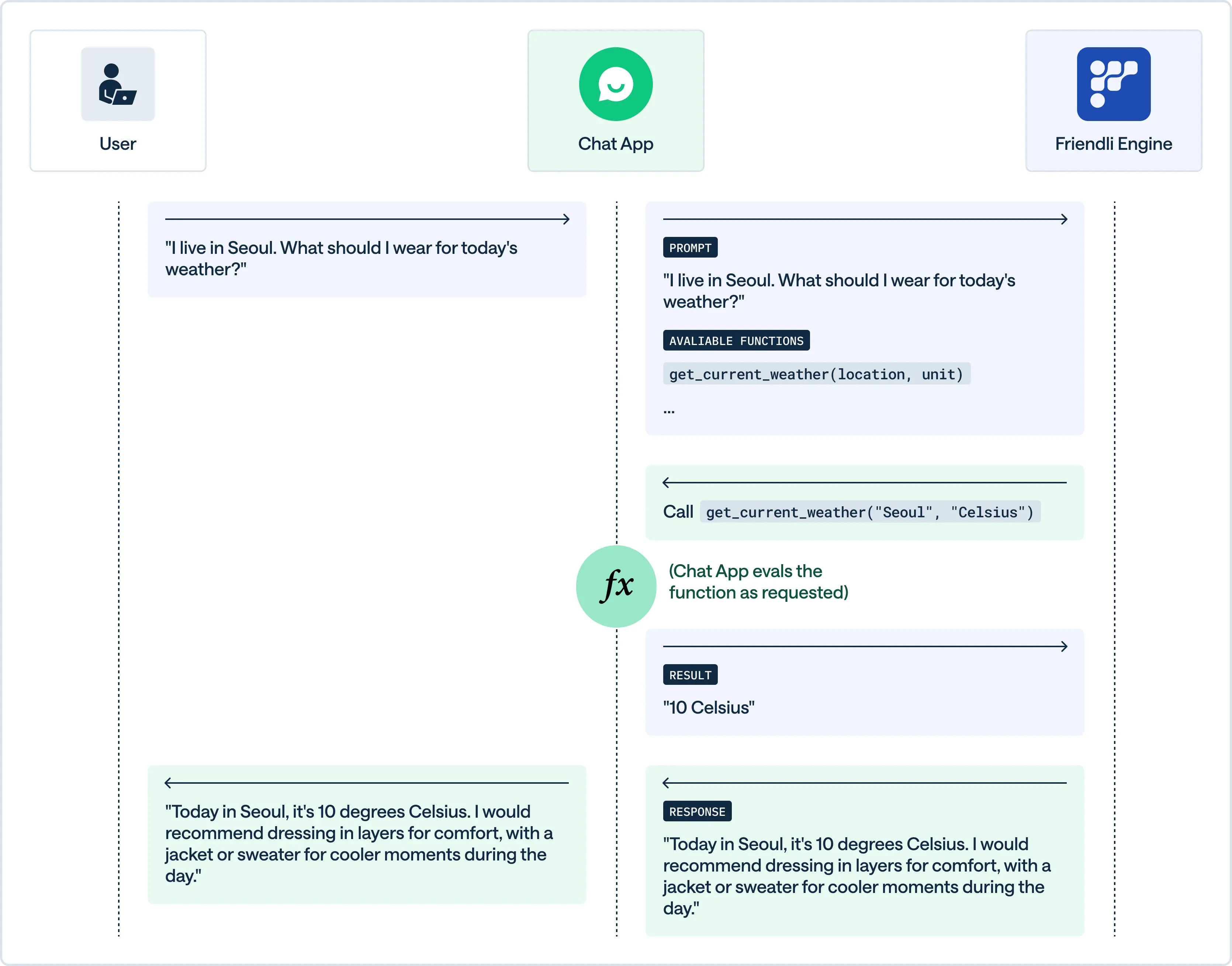
Tool calling (also called function calling) connects LLMs to external systems, enabling real‑time data access and action execution—a capability essential for agentic workflows.
 ## Broad Model Coverage
Friendli supports tool calling for a wide range of open‑source and commercial models. \
You can browse available models on our [Models page](https://friendli.ai/models) and try them out with the Playground.
## Tool Calling with Friendli
### Tool Calling Parameters
To enable tool calling, use the `tools`, `tool_choice`, and `parallel_tool_calls` parameters.
| Parameter | Description | Default |
| --------------------- | ---------------------------------------------------------------------- | ------- |
| `tools` | The list of tool objects that define the functions the model can call. | - |
| `tool_choice` | Determines the tool calling behavior of the model. | `auto` |
| `parallel_tool_calls` | Whether to let the model issue tool calls in parallel. | `True` |
By default, the model decides whether to call a function and which one to use.
With the `tool_choice` parameter, you can explicitly instruct the model to use a specific function.
* `none`: Disable the use of tools.
* `auto`: Enable the model to decide whether to use tools and which ones to use.
* `required`: Force the model to use a tool, but the model chooses which one.
* Named tool choice: Force the model to use a specific tool. It must be in the following format:
```json theme={null}
{
"type": "function",
"function": {
"name": "get_current_weather" // The function name you want to specify
}
}
```
### Response Schema
Friendli follows the OpenAI function calling schema. Tool calls are returned in `choices[].message.tool_calls[]` with each item containing a `function.name` and JSON‑stringified `function.arguments`. After executing a tool, append a new message with role: `tool`, the matching `tool_call_id`, and the tool result in content.
## Simple Example
The example below walks through five steps:
1. Define a tool (`get_weather`) that retrieves weather information.
2. Ask a question that triggers tool use.
3. Let the model select the tool.
4. Execute the tool.
5. Generate the final answer using the tool result.
## Broad Model Coverage
Friendli supports tool calling for a wide range of open‑source and commercial models. \
You can browse available models on our [Models page](https://friendli.ai/models) and try them out with the Playground.
## Tool Calling with Friendli
### Tool Calling Parameters
To enable tool calling, use the `tools`, `tool_choice`, and `parallel_tool_calls` parameters.
| Parameter | Description | Default |
| --------------------- | ---------------------------------------------------------------------- | ------- |
| `tools` | The list of tool objects that define the functions the model can call. | - |
| `tool_choice` | Determines the tool calling behavior of the model. | `auto` |
| `parallel_tool_calls` | Whether to let the model issue tool calls in parallel. | `True` |
By default, the model decides whether to call a function and which one to use.
With the `tool_choice` parameter, you can explicitly instruct the model to use a specific function.
* `none`: Disable the use of tools.
* `auto`: Enable the model to decide whether to use tools and which ones to use.
* `required`: Force the model to use a tool, but the model chooses which one.
* Named tool choice: Force the model to use a specific tool. It must be in the following format:
```json theme={null}
{
"type": "function",
"function": {
"name": "get_current_weather" // The function name you want to specify
}
}
```
### Response Schema
Friendli follows the OpenAI function calling schema. Tool calls are returned in `choices[].message.tool_calls[]` with each item containing a `function.name` and JSON‑stringified `function.arguments`. After executing a tool, append a new message with role: `tool`, the matching `tool_call_id`, and the tool result in content.
## Simple Example
The example below walks through five steps:
1. Define a tool (`get_weather`) that retrieves weather information.
2. Ask a question that triggers tool use.
3. Let the model select the tool.
4. Execute the tool.
5. Generate the final answer using the tool result.
 Define a function that the model can call (`get_weather`) with a JSON Schema.
The function requires the following parameters:
* `location`: The location to look up weather information for.
* `date`: The date to look up weather information for.
This definition is included in the `tools` array and passed to the model.
```python theme={null}
tools = [
{
"type": "function",
"function": {
"name": "get_weather",
"parameters": {
"type": "object",
"properties": {
"location": {"type": "string"},
"date": {"type": "string", "format": "date"}
},
},
},
}
]
```
When a user asks a question, this request is passed to the model as a `messages` array.
For example, the request "What's the weather like in Paris today?" would be passed as:
```python theme={null}
from datetime import datetime
today = datetime.now()
messages = [
{"role": "system", "content": f"You are a helpful assistant. today is {today}."},
{"role": "user", "content": "What's the weather like in Paris today?"}
]
```
Call the model using the `tools` and `messages` defined above.
```python OpenAI Python SDK theme={null}
import os
from openai import OpenAI
token = os.getenv("API_KEY") or ""
client = OpenAI(
base_url = "https://api.friendli.ai/serverless/v1",
api_key = token
)
completion = client.chat.completions.create(
model="zai-org/GLM-5.2",
messages=messages,
tools=tools,
)
print(completion.choices[0].message.tool_calls)
```
```python Friendli Python SDK theme={null}
import os
from friendli import SyncFriendli
with SyncFriendli(
token=os.getenv("API_KEY"),
) as friendli:
completion = friendli.serverless.chat.complete(
model="zai-org/GLM-5.2",
messages=messages,
tools=tools,
)
print(completion.choices[0].message.tool_calls)
```
The API caller runs the tool based on the function call information of the model.
For example, the `get_weather` function is executed as follows:
```python theme={null}
import json
import random
def get_weather(location: str, date: str):
temperature = random.randint(60, 80)
return {"temperature": temperature, "forecast": "sunny"}
tool_call = completion.choices[0].message.tool_calls[0]
tool_response = locals()[tool_call.function.name](**json.loads(tool_call.function.arguments))
print(tool_response)
```
```python Result: theme={null}
{'temperature': 65, 'forecast': 'sunny'}
```
Add the tool's response to the `messages` array and pass it back to the model.
1. Append tool call information
2. Append the tool's execution result
This ensures the model has all the necessary information to generate a response.
```python theme={null}
model_response = completion.choices[0].message
# Append the response from the model
messages.append(
{
"role": model_response.role,
"tool_calls": [
tool_call.model_dump()
for tool_call in model_response.tool_calls
]
}
)
# Append the response from the tool
messages.append(
{
"role": "tool",
"content": json.dumps(tool_response),
"tool_call_id": tool_call.id
}
)
print(json.dumps(messages, indent=2))
```
The model generates the final response based on the tool's output:
```python OpenAI Python SDK theme={null}
next_completion = client.chat.completions.create(
model="zai-org/GLM-5.2",
messages=messages,
tools=tools
)
print(next_completion.choices[0].message.content)
```
```python Friendli Python SDK theme={null}
next_completion = friendli.serverless.chat.complete(
model="zai-org/GLM-5.2",
messages=messages,
tools=tools
)
print(next_completion.choices[0].message.content)
```
```text Final output: theme={null}
According to the forecast, it's going to be a sunny day in Paris with a temperature of 65 degrees.
```
## Advanced Examples
Follow these blog posts to learn more about how to use tool calling with Friendli:
* Building an AI Agent for Google Calendar ([Part 1](https://friendli.ai/blog/ai-agent-google-calendar) / [Part 2](https://friendli.ai/blog/calendar-agent-vercel))
* Friendli Tools Blog Series ([Part 1](https://friendli.ai/blog/llm-function-calling) / [Part 2](https://friendli.ai/blog/ai-agents-function-calling) / [Part 3](https://friendli.ai/blog/friendli-tools-llama3-outperforms-gpt4o))
Define a function that the model can call (`get_weather`) with a JSON Schema.
The function requires the following parameters:
* `location`: The location to look up weather information for.
* `date`: The date to look up weather information for.
This definition is included in the `tools` array and passed to the model.
```python theme={null}
tools = [
{
"type": "function",
"function": {
"name": "get_weather",
"parameters": {
"type": "object",
"properties": {
"location": {"type": "string"},
"date": {"type": "string", "format": "date"}
},
},
},
}
]
```
When a user asks a question, this request is passed to the model as a `messages` array.
For example, the request "What's the weather like in Paris today?" would be passed as:
```python theme={null}
from datetime import datetime
today = datetime.now()
messages = [
{"role": "system", "content": f"You are a helpful assistant. today is {today}."},
{"role": "user", "content": "What's the weather like in Paris today?"}
]
```
Call the model using the `tools` and `messages` defined above.
```python OpenAI Python SDK theme={null}
import os
from openai import OpenAI
token = os.getenv("API_KEY") or ""
client = OpenAI(
base_url = "https://api.friendli.ai/serverless/v1",
api_key = token
)
completion = client.chat.completions.create(
model="zai-org/GLM-5.2",
messages=messages,
tools=tools,
)
print(completion.choices[0].message.tool_calls)
```
```python Friendli Python SDK theme={null}
import os
from friendli import SyncFriendli
with SyncFriendli(
token=os.getenv("API_KEY"),
) as friendli:
completion = friendli.serverless.chat.complete(
model="zai-org/GLM-5.2",
messages=messages,
tools=tools,
)
print(completion.choices[0].message.tool_calls)
```
The API caller runs the tool based on the function call information of the model.
For example, the `get_weather` function is executed as follows:
```python theme={null}
import json
import random
def get_weather(location: str, date: str):
temperature = random.randint(60, 80)
return {"temperature": temperature, "forecast": "sunny"}
tool_call = completion.choices[0].message.tool_calls[0]
tool_response = locals()[tool_call.function.name](**json.loads(tool_call.function.arguments))
print(tool_response)
```
```python Result: theme={null}
{'temperature': 65, 'forecast': 'sunny'}
```
Add the tool's response to the `messages` array and pass it back to the model.
1. Append tool call information
2. Append the tool's execution result
This ensures the model has all the necessary information to generate a response.
```python theme={null}
model_response = completion.choices[0].message
# Append the response from the model
messages.append(
{
"role": model_response.role,
"tool_calls": [
tool_call.model_dump()
for tool_call in model_response.tool_calls
]
}
)
# Append the response from the tool
messages.append(
{
"role": "tool",
"content": json.dumps(tool_response),
"tool_call_id": tool_call.id
}
)
print(json.dumps(messages, indent=2))
```
The model generates the final response based on the tool's output:
```python OpenAI Python SDK theme={null}
next_completion = client.chat.completions.create(
model="zai-org/GLM-5.2",
messages=messages,
tools=tools
)
print(next_completion.choices[0].message.content)
```
```python Friendli Python SDK theme={null}
next_completion = friendli.serverless.chat.complete(
model="zai-org/GLM-5.2",
messages=messages,
tools=tools
)
print(next_completion.choices[0].message.content)
```
```text Final output: theme={null}
According to the forecast, it's going to be a sunny day in Paris with a temperature of 65 degrees.
```
## Advanced Examples
Follow these blog posts to learn more about how to use tool calling with Friendli:
* Building an AI Agent for Google Calendar ([Part 1](https://friendli.ai/blog/ai-agent-google-calendar) / [Part 2](https://friendli.ai/blog/calendar-agent-vercel))
* Friendli Tools Blog Series ([Part 1](https://friendli.ai/blog/llm-function-calling) / [Part 2](https://friendli.ai/blog/ai-agents-function-calling) / [Part 3](https://friendli.ai/blog/friendli-tools-llama3-outperforms-gpt4o))